Showing posts with label EOY. Show all posts

Friday, June 19, 2015

Friday Fun 'Gotcha'

Before librarians and staff leave for the summer, there are library automation tasks to complete.
  • Turn off any automated email notices going to staff or students.
  • Holds & Reserves - Decide if you need to delete them or leave active for the start of the next school year.
  • Please inform the Library Automation Team if the library will be open and/or circulating during the summer. This allows maintenance to be scheduled when it will not interrupt library operations. If the library will be used for summer school, let us know.
  • Some libraries need to submit reports with statistical information at the end of year. Some common ones are listed below.
Popular END OF YEAR Reports:
To find the items deleted/weeded: Reports>Library Reports> Weeding Log. Select the date ranges needed; by month, school year, calendar year.
Circulation statistics. Circulation>Library Information. Choose a date range.
BEDS’ type information: Reports>Library Reports>Statistics>Collection Statistics Summary
You can set up the library calendar for the upcoming school year if you'd like. Instructions and a tutorial are located on the "Back to School" help page.

Thursday, June 18, 2015

ILL Statistics due tomorrow Friday 6-19

Click here for form. 

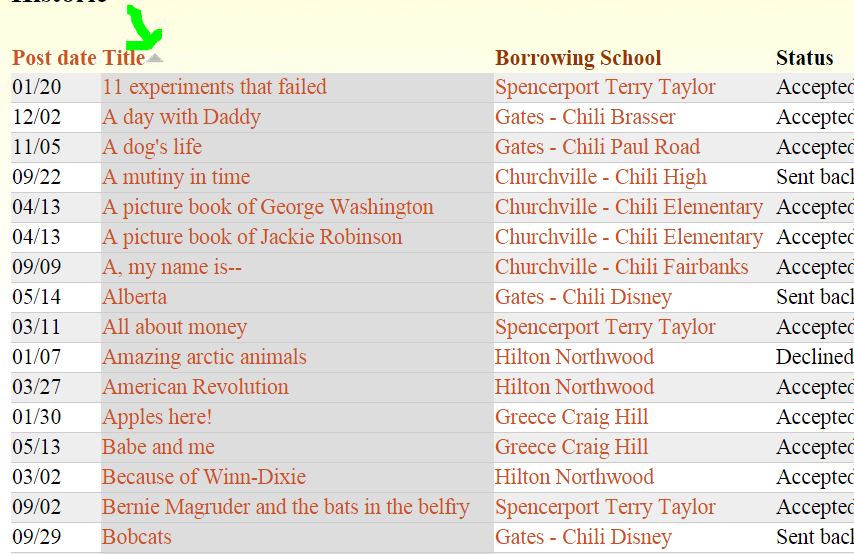
You can sort by column headers in Five Systems to group by building or title if you need more information. Makes searching easier, too.


Thursday, June 19, 2014

End of Year count down

Before librarians and staff leave for the summer, there are library automation tasks to complete.
  • Turn off any automated email notices going to staff, students and ILL patrons.
  • Holds & Reserves - Decide if you need to delete them or leave active for the start of the next school year.  
  • Some libraries need to submit reports with statistical information at the end of year. Do you have what you need? If not, please contact us.
  • Return any loaned barcode scanners to Library Automation at the CaTS building, BOCES 2
  • Please inform the Library Automation Team if the library will be open and/or circulating during the summer. This allows maintenance to be scheduled when it will not interrupt library operations. If the library will be used for summer school, let us know. Thank you to the librarians that have already told us.   

Wednesday, June 11, 2014

Library circulation statistics & Titles without copies

Here's a quick way to look at circulation stats in Destiny. It's called a snapshot. Library Reports>Statistics>Library Statistics. You can select options at the bottom to customize the report. Popular END OF YEAR Reports: 
  • To find the items deleted/weeded: Reports>Library Reports> Weeding Log. Select the date ranges needed; by month, school year, calendar year.
  • BEDS’ type information: Reports>Library Reports>Statistics>Collection Statistics Summary
If you'd like more information about End of Year Reports, please contact the Library Automation Team.

Schools will have a higher number of Titles without copies this year. The SLS provided eBook records were put in your Destiny catalog. They don't have copies. 

Monday, June 17, 2013

End of year TO DO list for Destiny

Before librarians and staff leave for the summer, there are library automation tasks to complete.
  • Turn off any automated email notices going to staff or students.
  • Holds & Reserves - Decide if you need to delete them or leave active for the start of the next school year.
  • Please inform the Library Automation Team if the library will be open and/or circulating during the summer. This allows maintenance and upgrades to be scheduled when it will not interrupt library operations.
  • Generate the needed reports for statistical information.
You can find more information here:
 

Tuesday, June 11, 2013

Circulation Snap-Shot for items out


At the end of the year libraries like to monitor the ‘rate of returns’ for items checked out. For quick information: Circulation>Library Information. Click on the Statistics tab.

Monday, May 20, 2013

End of Year - Reporting


Some libraries want to submit reports to their administrators with statistical information at the end of the school year. Here are some ideas:

To find the number of items added to the collection during the school year: Reports>Library>Title & Copy list. Choose from the dropdown choices: ‘Date Copies Added’, ‘After the Date’. You can choose to display the report in XL format or as a PDF.

To find the items deleted/weeded: Reports>Library Reports> Weeding Log. Select the date ranges needed; by month, school year, calendar year.

Circulation statistics. Circulation>Library Information. Choose a date range.

BEDS information: Reports>Library Reports>Statistics>Collection Statistics Summary

 
If you'd like more information or have questions about reporting features in Destiny, do not hesitate to contact the Library Automation Team.